Pathfinding Maze
An editable neon maze where BFS, Dijkstra, A* and greedy search race to the goal, step by step
.zip · HTML / CSS / JS · v1.0.0
Free — no account, no email. Always the newest version.
Live preview
About
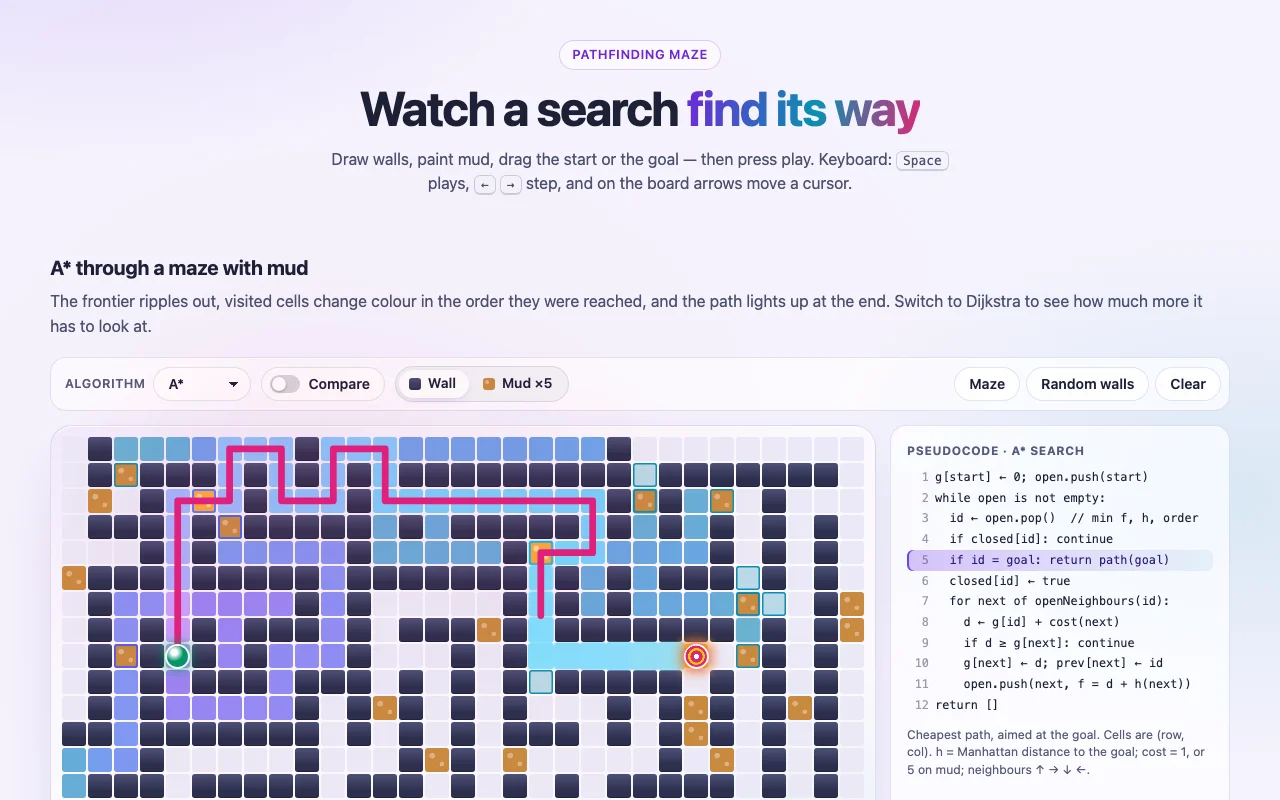
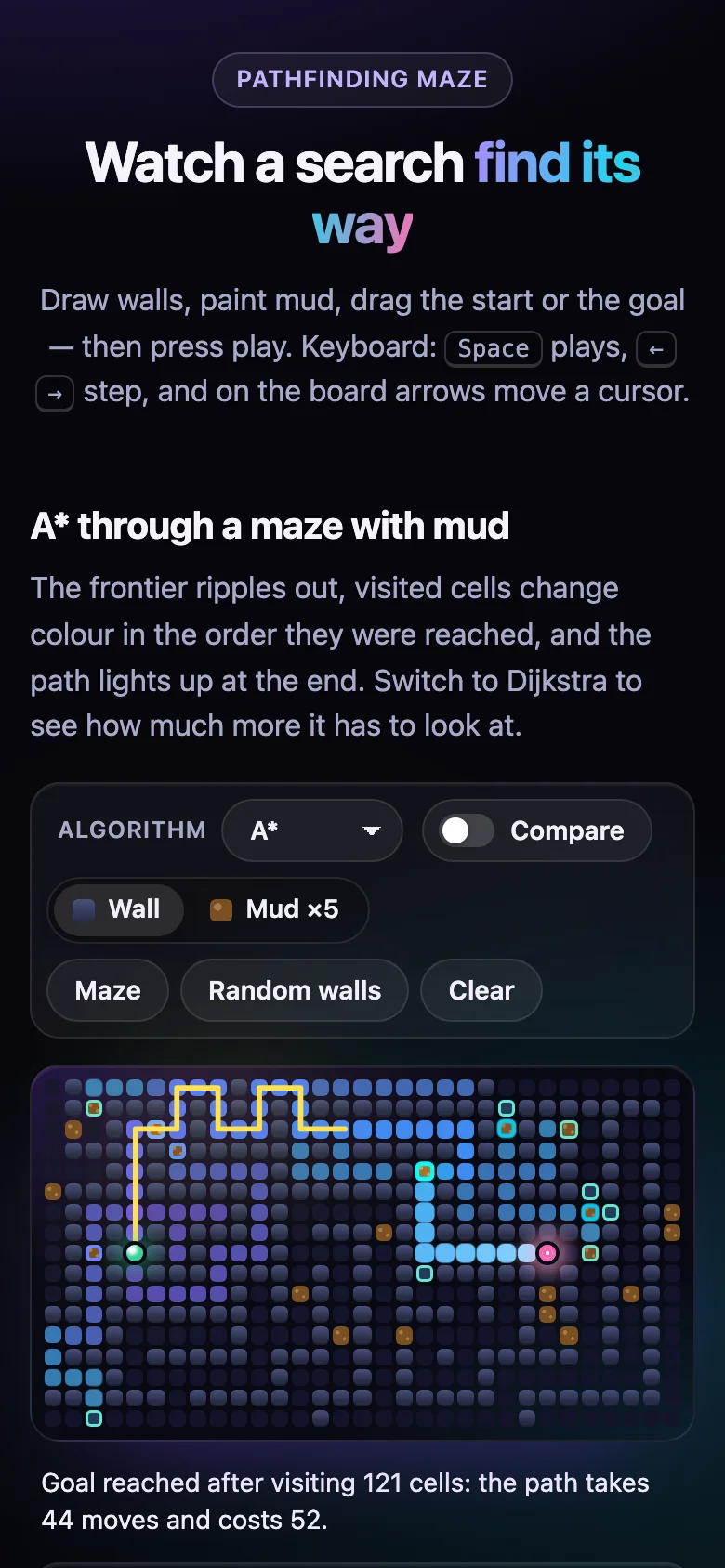
A maze you can draw on, and four search algorithms you can watch think. The frontier ripples out cell by cell, every visited cell takes a colour from the order it was reached, and when the goal is found the path draws itself in as a glowing line. Paint mud, drag the goal, and see A* pick a different road — or put two algorithms side by side and let them race on the same board.
Made for lessons, slides and videos: every step has a plain-words caption and its line of pseudocode lit up, and the neon-on-ink look reads well on a projector and in a recording.
- BFS, Dijkstra, A* and greedy best-first, with the counters that tell them apart
- BFS and A* follow the free Grid Pathfinding page exactly: same neighbour order, same ties, same stop rule
- Seeded mazes and random walls, so a recording can be made twice and look the same
- Every colour, radius and timing is a CSS custom property
- Nothing to install: one CSS file and one script, or one React component
Features · 10
- Four searches: BFS, Dijkstra, A* (Manhattan) and greedy best-first
- Draw and erase walls, paint mud that costs 5 to cross, drag the start and the goal
- Seeded maze generator (recursive backtracker) and random walls: the same seed, the same board
- The frontier ripples out, visited cells shift colour in visiting order, the path draws itself in
- Compare mode: two algorithms side by side on the same board, the better counts starred
- Player: play, pause, step, scrub, 0.5×–4× speed, live pseudocode and plain-words captions
- Counters: cells visited, frontier, path length, path cost and the step
- Edit a solved maze and the path re-routes on the spot
- BFS and A* follow the free Grid Pathfinding page line for line
- Plain HTML/CSS/JS and React (Next.js ready) builds, zero dependencies
How to use it
Link the stylesheet and the script once, then mark an empty element with data-pathfinding-maze.
The maze — tools, board, pseudocode, counters and player — is built inside it:
<link rel="stylesheet" href="pathfinding-maze.css" />
<script src="pathfinding-maze.js" defer></script>

<div data-pathfinding-maze data-pathfinding-algorithm="astar" data-pathfinding-mud="0.06"></div>

<div data-pathfinding-maze data-pathfinding-algorithm="bfs" data-pathfinding-compare="dijkstra"
     data-pathfinding-layout="random" data-pathfinding-autoplay="false"></div>
Options as data attributes (data-pathfinding-…):
| Attribute | Default | What it does |
|---|---|---|
-algorithm |
astar |
bfs, dijkstra, astar or greedy |
-compare |
off | A second algorithm side by side on the same board; empty = Dijkstra (BFS against Dijkstra) |
-cols, -rows |
31, 17 |
Board size in cells, 5–99 each |
-layout |
maze |
What the board starts as: maze, random (walls) or empty |
-seed |
7 |
Seed of the maze and the random walls: the same seed, the same board |
-mud |
0 |
Share of the open cells the layouts turn to mud, 0–0.5 |
-speed |
1 |
0.25–4 (the menu offers 0.5×, 1×, 2×, 4×) |
-autoplay |
on | Play on load — never with prefers-reduced-motion; "false" to wait for Play |
-loop |
off | Start over at the end |
Mazes added after the page loads: PathfindingMaze.init(container), or
PathfindingMaze.createPathfindingMaze(element, { algorithm: "dijkstra" }) — both return a function
that removes the maze again. PathfindingMaze.traceSearch(board, "astar") hands you the frames
themselves, if you want to draw them your own way.
Moves go to the 4 neighbours, looked at in the order up, right, down, left. Stepping onto a cell costs 1, or 5 on mud. Every search stops when the goal is taken off the frontier, not when it is first seen. Ties go to the lower priority, then to the cell pushed first; A* ranks by f = g + h, then by the lower h (h = Manhattan distance). BFS and A* are exactly the listings of the free Grid Pathfinding page, so the cells-visited counts match it. BFS counts moves and ignores mud.
Copy PathfindingMaze.tsx, pathfinding-maze.css and the core folder into your project:
import { PathfindingMaze } from "./PathfindingMaze";

<PathfindingMaze algorithm="astar" mud={0.06} />
<PathfindingMaze algorithm="bfs" compare="dijkstra" layout="random" seed={16} autoplay={false} />
Props have the names of the attributes above (compare also takes true). Every other prop goes
to the root <div> (className, id, aria-label…). Changing a prop builds the maze afresh.
React 18 or 19.
The component starts with "use client", so use it from any page or server component. The server
sends an empty box; the maze is built in the browser. With the App Router nothing else is needed.
With the Pages Router, move the CSS import into pages/_app.
Set these on .pathfinding-maze (or a class of your own):
| Property | What it changes |
|---|---|
--maze-ink, --maze-cell |
The board's screen and its empty cells |
--maze-wall, --maze-wall-top |
Walls (a gradient, top to bottom) |
--maze-mud, --maze-mud-dots |
Mud and its speckles |
--maze-frontier |
Cells waiting on the frontier |
--maze-visited-from, --maze-visited-to |
The wave of visited cells: first colour, last colour |
--maze-current, --maze-path |
The cell being visited, the path line |
--maze-start, --maze-goal, --maze-danger, --maze-best |
The ends, "no path", the best counts in compare mode |
--maze-text, --maze-muted, --maze-accent, --maze-accent-2 |
Text, quiet text, focus ring and play button |
--maze-surface, --maze-border, --maze-blur |
The glass around the board |
--maze-radius, --maze-cell-radius, --maze-gap |
Corners and the grid lines between cells |
--maze-font, --maze-mono |
Type, and the pseudocode's |
--maze-duration, --maze-ripple, --maze-path-draw, --maze-ease |
Speed of the small moves, the ripple of a visited cell, the path drawing in |
Colours use light-dark(): they follow color-scheme on your page. With prefers-reduced-motion,
every animation and transition is off: frames change at once, and stepping still works.
Ask about this product
Not sure it fits your project? Ask — the answer comes from this page.
Changelog
1.0.0First releaseLatest
Plain HTML/CSS/JS and React builds of an editable maze that animates BFS, Dijkstra, A* and greedy best-first step by step, with mud, a seeded maze generator, side-by-side compare, pseudocode, keyboard and reduced-motion support.
- Fixes and new features land behind the same download, which always serves the latest version.